Email and password
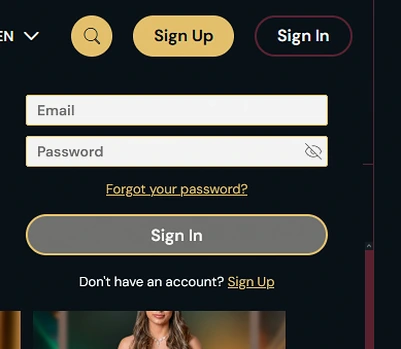
Use the email address and password from registration on a computer, in a mobile browser or in the installed web app.
Your Riviera Spin visit is starting
We are opening the casino offer. Check the conditions before you continue.
Log In to Riviera Spin Casino
Sign in with your email and password, or use Face ID and fingerprint once our web app is installed. Two-factor codes arrive by authenticator app or SMS.
Keeping Your Login Safe
Steps to take
Things to avoid
Ways to Sign In
Email and password
Use the email address and password from registration on a computer, in a mobile browser or in the installed web app.
Two-factor authentication
A six-digit code from an authenticator app or SMS, valid for 5 minutes, plus eight backup codes.
Face ID and fingerprint
Biometric login becomes available after you install the web app from the browser menu.
You sign in with the email address and password from registration at RivieraSpin, on a computer, in a mobile browser or in our installed web app, and all three routes use the same two fields. 18+ only. Please gamble responsibly. Full bonus terms apply.
Open our website in your desktop browser, select Login, then type your email address and password. If two-factor authentication is on, enter the six-digit code from your authenticator app or SMS. The lobby opens with an account menu that shows your Riviera Club progress and 12 months of payment history. 18+ only. Please gamble responsibly. Full bonus terms apply.
The steps are the same on a phone or tablet. After sign-in, the bottom bar gives you Lobby, Live, Promotions, Club and Cashier, so deposits and withdrawals are one tap away.
Use the address attached to your existing customer profile. Moving between phone, tablet and computer does not call for another registration. The bottom navigation is a set of product shortcuts after access, not a separate sign-in method. Choose Cashier for a payment and the account history for an existing request. Do not try to diagnose a login by repeating a deposit.
Check the environment when a device option appears missing. A normal browser tab can display the same lobby as the installed web app without providing the same biometric prompt. Use the described browser route with your email and password. If a second factor is configured, follow its separate prompt. Keep the phone private during that confirmation and sign out yourself before lending it to somebody else.
Tap the RivieraSpin icon on your home screen and confirm with Face ID or your fingerprint. If you prefer, you can type your email and password instead.
The icon leads to the already registered account. It does not create a new mobile wallet or change the owner of existing balances. If the biometric prompt is unavailable, choose the email-and-password fallback instead of opening another profile. Describe whether the problem belongs to the device prompt or the later account confirmation when requesting help.
Keep backup access apart from the open app session. Recovery codes need to remain usable if the usual confirmation device is missing. A sole copy on that same lost handset would remove both routes together. Never give an unused recovery code to someone offering to complete the sign-in for you. A support conversation can work from the error and selected entry route without taking possession of the value that grants access.
We offer two ways to sign in: email with password, and Face ID or fingerprint after you install the web app. The table shows where each one works.
| Method | Where it works | What you need |
|---|---|---|
| Email and password | PC browser, mobile browser, installed web app | The email address and password from registration |
| Face ID or fingerprint | Installed web app | The web app added to your home screen from the browser menu |
After sign-in, the account menu lists your active codes with a wagering bar, and the full bonus terms explain how each one counts. 18+ only. Please gamble responsibly.
Email-and-password access and device biometrics are ways into the same profile. An authenticator or SMS confirmation performs a different job as an additional check. Follow the field labels so that a current code is not entered as the account password. Select a confirmation channel you can reach at the time rather than starting repeated sign-ins without the needed device.
Inside the profile, the real balance, bonus balance, Riviera Club progress and active-code counter are different account indicators. A reward still subject to wagering should not be assumed to behave like ordinary available cash. Read the active offer and its progress together. 18+ only. Full bonus terms apply.
Use payment history to locate a previous request after recovering access. The history helps you explain which transfer is in question. That is different from describing a password failure. Keeping the two separate prevents a payment awaiting internal approval from being treated as another unsuccessful sign-in.
Two-factor authentication, encrypted connections and automatic logout protect each login. The table lists the settings that apply to your account.
| Safeguard | Setting |
|---|---|
| Two-factor methods | Authenticator app or SMS |
| Code length and validity | Six digits, valid for 5 minutes |
| Backup codes | Eight |
| Inactive session | Ends after 45 minutes |
| Connection | TLS 1.3 with 256-bit keys |
| Card details | Stored only as tokens by a PCI DSS Level 1 processor |
Our servers are in Lisbon, and a DigiCert Extended Validation certificate secures the cashier.
The security measures protect different stages of access. Traffic encryption applies between the device and the platform, while a password and second factor concern entry to the account. Neither makes an unattended unlocked phone private. Close a shared-device session yourself rather than waiting for its automatic expiry.
Keep the reset message private just as you would the current password. Our team can explain the required recovery step without choosing a password for you. Do not forward a requested link or send active confirmation values in a general chat. When asking for assistance, identify the screen and the point at which the flow stops. That provides useful information while keeping the account credentials under your own control.
The account’s history is useful after recovery because an earlier payment remains a separate transaction. Read its existing status before opening another request. Membership progress, reward conditions and cashier review describe different account events, so identify the affected area when contacting our team. 18+ only. Full bonus terms apply.
Most failed sign-ins come from a forgotten password, a lockout after six wrong attempts or an expired code, and each has a direct fix.
| Problem | What happens | Fix |
|---|---|---|
| Forgotten password | We email a reset link valid for 30 minutes | Set a new password of at least 10 characters with a letter and a digit |
| Six wrong passwords | The login locks for 20 minutes | Wait 20 minutes, then try again or reset the password |
| Two-factor code rejected | A code stays valid for 5 minutes | Request a fresh code or use one of your eight backup codes |
| Still stuck | Our team can check the account | Use live chat, open 24/7 in English, or write to [email protected] for an answer within 24 hours |
A failed password, an expired code, a timed lock and an inactivity logout are separate situations. Read the message before choosing whether to retry, wait or recover access. Repeated guessing does not remove a timed block. Being returned to sign-in after inactivity is not itself proof that the password changed.
Request recovery through the account flow and use the message you deliberately requested. Its link has its own deadline, separate from the duration of a normal session. Choose a replacement that satisfies the stated rules. If the difficulty continues, explain whether it appears before or after the additional confirmation and whether you opened a browser tab or installed icon. Leave credentials, full card data and current codes out of that description.
Registration is a single page that asks for your email, password, name, date of birth, address and mobile number, and it takes about 90 seconds. You must be 18 or older. You enter the welcome code at your first deposit. 18+ only. Please gamble responsibly.
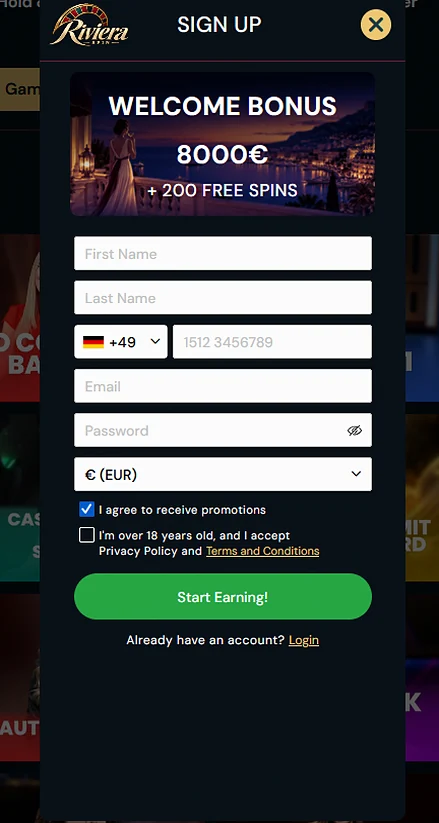
Reference image from another currency setting. Amounts in GBP or EUR shown in the image are not the AUD offer described on this page.
Login Questions
Yes, Face ID and fingerprint login are available once you have installed our web app from the browser menu. Email and password remain the base sign-in method.
The emailed reset link is valid for 30 minutes, and the new password needs at least 10 characters with a letter and a digit.
Six wrong passwords in a row lock the login for 20 minutes. After that you can try again or reset the password by email.
Sign In to Riviera Spin
Explore the four-deposit package up to $12,800 and 200 free spins. 18+. Conditions apply.
18+ only. Gambling can cause harm. Set limits and read the offer conditions before depositing.